Binary Language Translator — Binary Translator
Binary language translator on this page means converting UTF-8 text to eight-bit bytes and back. Binary translator converts UTF-8 text to eight-bit bytes and back, without padding incomplete input or replacing invalid bytes.
Original UTF-8 byte round trip
We created four text samples, including an accented character and an emoji. Each was encoded into UTF-8 bytes, displayed as eight-bit binary groups, then decoded with strict UTF-8 validation. We compared the recovered text directly with the original. Every sample matched. This test measures byte sequences rather than numeric ASCII code-point tables.
| Original text | UTF-8 bytes | Binary bits | Eight-bit groups | Recovered text |
|---|---|---|---|---|
| Hi | 2 | 16 | 01001000 01101001 | Hi |
| é | 2 | 16 | 11000011 10101001 | é |
| 🚀 | 4 | 32 | 11110000 10011111 10011010 10000000 | 🚀 |
| Hi é 🚀 | 10 | 80 | 01001000 01101001 00100000 11000011 10101001 00100000 11110000 10011111 10011010 10000000 | Hi é 🚀 |
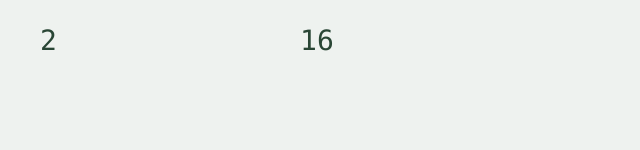
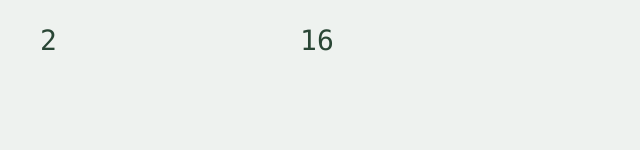

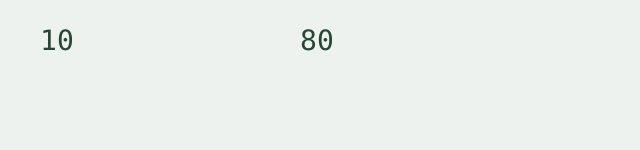
Byte counts were measured from the generated byte arrays. Bit counts were calculated as the measured byte count multiplied by eight. The recovered text cells were measured by decoding those exact binary groups. To reproduce a row, paste its original text in Text to binary mode, translate, then use Swap direction and result. Compare the recovered text with the same row.
How to translate
Select Text to binary to encode a text sequence, or Binary to text to decode bytes. Binary input accepts whitespace-separated eight-bit groups or a continuous string whose length is divisible by eight. Every separated group must be a complete byte. Invalid characters are reported by position. The tool does not append zeros, discard nonbinary characters or insert replacement characters for invalid UTF-8.
Encoding and scope
This binary code translator uses UTF-8. Basic English characters occupy individual bytes; other characters can occupy several bytes. It is not a raw ASCII code-point converter, an executable binary-file reader, a machine-code disassembler or an encryption tool. A binary translator to english can recover English only when the supplied bytes encode English text; it does not translate other languages into English.
What does binary code text mean here?
Here it means text represented as eight-bit binary bytes. Both directions belong to this one page; no separate conversion page is needed.
Limits and privacy
Input is limited to 20,000 characters per run. One sequence is processed at a time. There is no batch mode, login, file upload or saved history. Conversion runs locally without transmitting the input.
How is this different from ASCII?
For numeric character values, use the Text to ASCII encoder or the ASCII code to text decoder. Those pages distinguish standard ASCII and ISO-8859-1. This page uses complete UTF-8 bytes, so a single displayed character can correspond to multiple binary groups.
What does binary language translator mean here?
This binary language translator converts a text representation into binary bytes and back. It does not translate languages, interpret machine instructions or turn arbitrary bytes into readable text. The existing strict UTF-8 rules still apply.
Related encoding walkthrough
This existing video demonstrates hexadecimal byte input and Base64 output. It is a related byte-representation walkthrough, not the binary experiment above.
Loading the player connects to YouTube and shares connection information such as your IP address and playback requests.
For binary integers rather than text bytes, use the Binary to decimal and decimal to binary converter.
For puzzle letter shifts rather than byte encodings, use the Caesar cipher decoder and ROT13 tool.
For written dots and dashes in either direction, use the Morse code text translator.