Text to ASCII — ASCII to Hex
Text to ASCII includes ascii to hex when Hexadecimal output is selected; the selected ASCII or ISO-8859-1 range still applies.
Original sample: encode and recover Map!
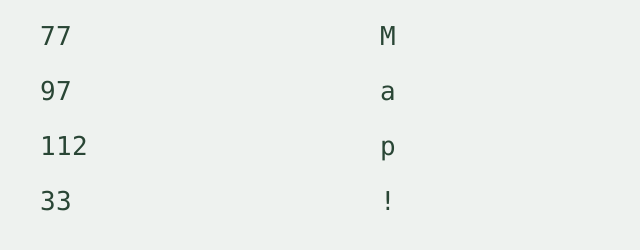
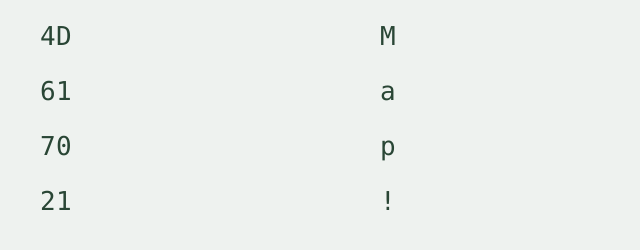
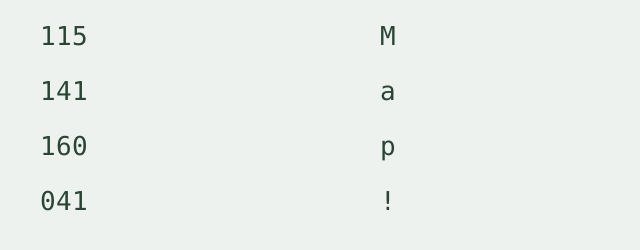
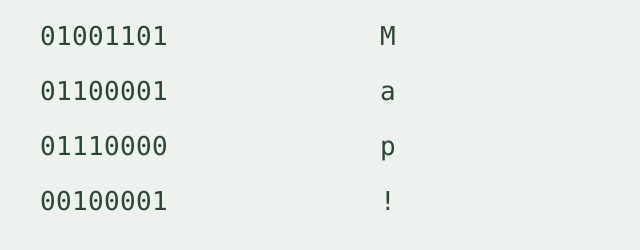
We created Map! as this page’s sample. We ran it through the encoder in decimal, hexadecimal, octal and binary with full-width padding, then decoded each output with the matching base. Each recovered character matched the original. The table below records this controlled run, not an imported character table.
| Decimal | Hex | Octal | Binary | Character |
|---|---|---|---|---|
| 77 | 4D | 115 | 01001101 | M |
| 97 | 61 | 141 | 01100001 | a |
| 112 | 70 | 160 | 01110000 | p |
| 33 | 21 | 041 | 00100001 | ! |
Recorded round trips
- Base 10: 077 097 112 033 → Map!; each character matched.
- Base 16: 4D 61 70 21 → Map!; each character matched.
- Base 8: 115 141 160 041 → Map!; each character matched.
- Base 2: 01001101 01100001 01110000 00100001 → Map!; each character matched.
How to ascii encode text
Paste one text sequence, choose an output base and character range, then encode and copy. Spaces and line breaks in your text are characters to encode; they are not independent batch items. Output codes can be separated by spaces, commas or nothing. Padding produces full byte-width groups. Without separators, retain the base and padding settings because variable-width codes can have several possible groupings when decoded.
Character range and errors
Standard ASCII includes values from 0 through 127. Extended mode uses ISO-8859-1 values from 0 through 255; it is not Windows-1252 or UTF-8 byte encoding. A character outside the selected range produces its position and Unicode code point in an error message. The tool clears the old result and produces no partial output. Control characters in the input are included in the numeric output.
Scope and limits
One text sequence is processed per run, with a 20,000-character input limit. Conversion runs in your browser. There is no file upload, login, batch mode or saved conversion history. No external conversion service receives your text.
Does ascii encode mean text to ascii?
Yes. Here these names describe the same direction: text characters become numeric character codes. They belong on this one tool page.
How can I recover the text?
Use the ASCII code to text decoder with the same numeric base and character range. Use separated codes or select the matching fixed group width for padded continuous output.
Is this Base64 text encoding?
No. ASCII codes represent individual characters. For Base64 output from UTF-8 bytes, use the Text to Base64 encoder.
ASCII to hex on this page
For ascii to hex, enter text and select Hexadecimal as the output base. Keep Standard ASCII selected for ASCII characters; the separate extended mode remains ISO-8859-1.
Is ascii to hex UTF-8 byte encoding?
No. This tool outputs character code values within the selected range. It does not turn arbitrary Unicode text into UTF-8 hex bytes or label non-ASCII characters as standard ASCII.
Related encoding walkthrough
This existing video demonstrates hexadecimal byte input and Base64 output. It covers a different direction from encoding text as ASCII codes.
Loading the player connects to YouTube and shares connection information such as your IP address and playback requests.
For UTF-8 text and eight-bit bytes in either direction, use the Binary text translator.
For every standard character and named control code, see the Complete ASCII table.