Unicode Converter
Unicode converter shows the same text as Unicode code points and UTF-8 bytes, and converts supported code-point notation or valid UTF-8 bytes back to text without normalization.
Text
—
Unicode code points
—
UTF-8 hex bytes
—
No conversion yet.
Other supported representations
UTF-16 \uXXXX escape notation
—
Decimal scalar values
—
Ready. Code points are not UTF-8 bytes.
Original Latin, CJK and emoji checks
We computed these four text samples independently with Python’s Unicode and byte encoders and this page’s JavaScript. Every code point and UTF-8 byte matched. Each sample returned to the exact original through U+ notation, decimal values, UTF-16 escapes and UTF-8 decoding. No normalization was applied. The table was generated from those calculations, not copied from another converter.
| Text | U+ scalar values | UTF-8 hex bytes | Code points | UTF-8 bytes per point / total |
|---|---|---|---|---|
| Café | U+0043 U+0061 U+0066 U+00E9 | 43 61 66 c3 a9 | 4 | 1,1,1,2 / 5 |
| 中文日本語 | U+4E2D U+6587 U+65E5 U+672C U+8A9E | e4 b8 ad e6 96 87 e6 97 a5 e6 9c ac e8 aa 9e | 5 | 3,3,3,3,3 / 15 |
| 🚀🙂 | U+1F680 U+1F642 | f0 9f 9a 80 f0 9f 99 82 | 2 | 4,4 / 8 |
| é | U+0065 U+0301 | 65 cc 81 | 2 | 1,2 / 3 |
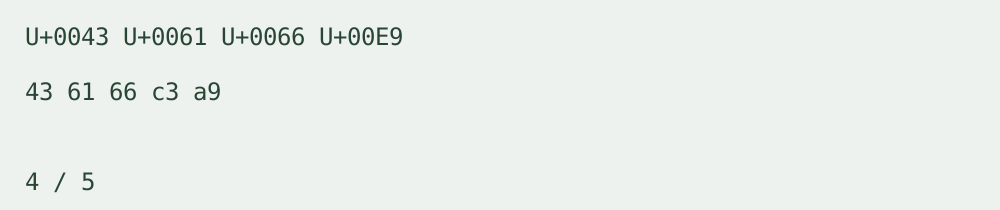
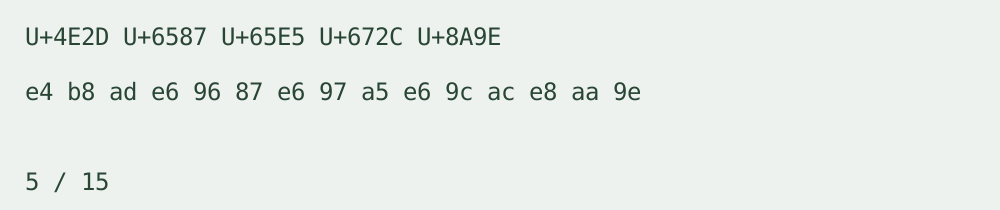
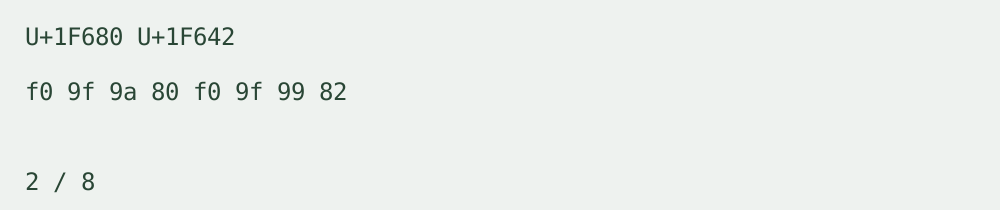
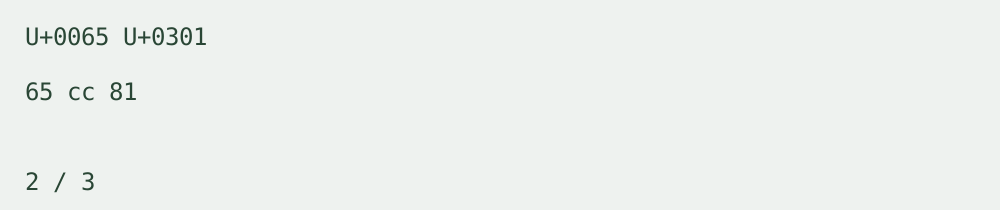
The Latin sample includes é: its single U+00E9 point uses the UTF-8 bytes c3 a9. The CJK sample has five points using three bytes each. Each emoji in the third sample is one scalar value and four UTF-8 bytes, but two UTF-16 units in the escape representation. The final sample is e followed by U+0301, a combining accent. It remains two points and three UTF-8 bytes even though its display can resemble é. This comparison demonstrates why visible characters, scalar values and bytes are not interchangeable counts.
To reproduce a row, paste its text and inspect all three panels. Select a different representation to copy, then choose the corresponding input kind and syntax to decode it back. Match the exact text rather than its visual appearance.
U+, escape notation and decimal input
U+ notation names a scalar value: U+0041 is A, and a supplementary value such as U+1F680 needs more than four hex digits. This page accepts U+ followed by four to six hex digits, separated by whitespace or commas. It accepts only values from U+0000 through U+10FFFF excluding the surrogate range U+D800–U+DFFF.
The notation \uXXXX is a UTF-16 escape sequence, not a separate code point. This page accepts exactly four hex digits per escape. Supplementary points require a valid high/low surrogate pair: \uD83D\uDE80 represents U+1F680. Unpaired surrogates are rejected. Braced escapes and other escape spellings are not supported.
Decimal input is the same scalar value written in base ten, separated by whitespace or commas. For example, decimal 65 and U+0041 both name A. UTF-8 byte values are not decimal code-point input.
UTF-8 decoder and byte lengths
The utf8 decoder accepts complete hexadecimal byte pairs, joined or separated by whitespace or commas. It rejects malformed UTF-8, overlong forms and surrogate encodings instead of inserting replacement characters. A leading byte-order mark is retained as U+FEFF. UTF-8 encodes a scalar value into one to four bytes; the panels report each point’s actual byte length and the total.
Input, output and limits
One text input up to 10,000 Unicode scalar values. Encoded input is limited to 160,000 characters; UTF-8 input additionally has a 40,000-byte limit. Decoded text is also limited to 10,000 scalar values. Non-scalar values, unknown notation and malformed sequences produce explicit errors and no partial output. Text case, spaces, line breaks and combining points are preserved.
Output is text, code-point notation, UTF-16 escape notation, decimal scalar values or UTF-8 hex bytes with one-click copy. No login, registration, upload, batch mode, saved history or daily counter. Processing stays in your browser.
Related text and byte tools
Hex Decoder handles UTF-8 hex bytes and text; Text to Base64 represents UTF-8 bytes as Base64; ASCII Decode handles its stated ASCII character-code range. This page keeps Unicode scalar values, UTF-16 escapes and UTF-8 bytes distinct.
Related representation walkthrough
This existing walkthrough compares character-art settings. It is not a Unicode normalization or decoding tutorial.
Loading the player connects to YouTube and shares connection information such as your IP address and playback requests.
Watch the existing character representation walkthrough on YouTube