Hex to Decimal
Hex to decimal converts integer values exactly in both directions; this tool does not interpret bytes as text.
Original exact-integer round trip
We prepared four integer inputs covering zero, a negative value and large positive values. We converted each hex input to decimal with this page’s BigInt function, then converted the decimal result back to hex and compared it with the normalized original. Every row matched. The values below are outputs from that local run, not estimates or text byte conversions.
| Hex input | Decimal result | Recovered hex | Exact comparison |
|---|---|---|---|
| 0 | 0 | 0 | Matched |
| -FF | -255 | -FF | Matched |
| 20000000000001 | 9007199254740993 | 20000000000001 | Matched |
| FFFFFFFFFFFFFFFF | 18446744073709551615 | FFFFFFFFFFFFFFFF | Matched |


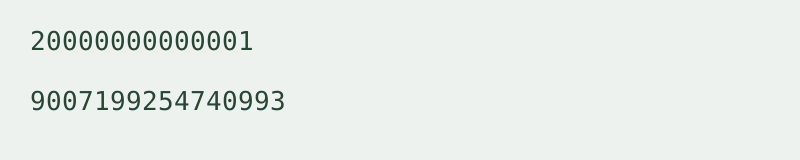
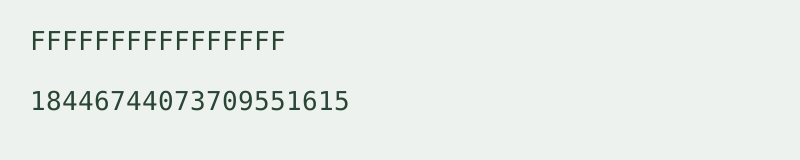
The sample 20000000000001 produced 9007199254740993 and returned to 20000000000001. The tool performs integer arithmetic rather than passing the value through a floating-point Number. To repeat a row, choose Hex to decimal, enter the input, convert, then use Swap direction and result. Compare the recovered hexadecimal value with the same row. Uppercase output and removal of leading zeros are formatting normalization; the integer value stays the same.
Input and output rules
Hex input accepts digits 0–9 and A–F in either case, an optional 0x prefix, and an optional leading plus or minus sign. Decimal input accepts digits 0–9 with an optional leading sign. Surrounding whitespace is removed. Internal spaces, commas, fractions and exponent notation are rejected. Errors clear the previous result rather than producing a partial value.
Negative values use a leading minus sign. This is signed magnitude notation, not a fixed-width two’s-complement interpretation. Output decimal is an integer string; output hex uses uppercase digits without a prefix. Leading zeros and a negative sign on zero normalize to zero.
Decimal to hex on this page
Use the reverse direction for decimal to hex. Both directions represent the same integer in different bases and belong on this one page. This page does not support fractions or infer an integer from a text file.
Scope, limits and privacy
Conversion uses native BigInt and runs locally in your browser. Input is limited to 10,000 characters per run; this is a tool limit, not a floating-point precision limit. One integer is processed at a time. No login, file upload, batch mode or conversion history is required. The tool does not transmit your input.
How is this different from Hex Decoder?
The Hex byte to text decoder interprets hexadecimal byte pairs as UTF-8 text. This page treats the entire input as one integer. It does not read character codes, perform Base64 conversion or process colors.
Related encoding walkthrough
This existing video demonstrates hexadecimal byte input and Base64 output. It covers a related representation, not integer base conversion.
Loading the player connects to YouTube and shares connection information such as your IP address and playback requests.
For binary integers rather than text bytes, use the Binary to decimal and decimal to binary converter.
For direct hex and binary integer conversion, use the Hex to binary and binary to hex converter.