Hex to Base64
Hex to Base64 encodes byte pairs: our four equivalent hex spellings produced AAE=, while odd-length and invalid-character samples produced no output.
Ready. Processing stays in your browser.
Controlled hex spelling and rejection test
We created eight controlled inputs for this run. Four express the same bytes using continuous pairs, spaces, prefixed comma-separated pairs and colon-separated pairs. Two contain different byte sequences. The final two are deliberately malformed: one has an odd digit count and one includes letters outside the hex alphabet. We ran every input through this page's parser and recorded the output or the rejection message.
| Input | Parsed hex | Bytes | Base64 | Recorded outcome |
|---|---|---|---|---|
0001 | 0001 | 2 | AAE= | Accepted |
00 01 | 0001 | 2 | AAE= | Accepted |
0x00,0x01 | 0001 | 2 | AAE= | Accepted |
00:01 | 0001 | 2 | AAE= | Accepted |
0f10 | 0f10 | 2 | DxA= | Accepted |
80ff | 80ff | 2 | gP8= | Accepted |
abc | Not produced | Not produced | Not produced | Odd hex digit count: each byte needs two digits. |
00zz01 | Not produced | Not produced | Not produced | Invalid hex characters. |
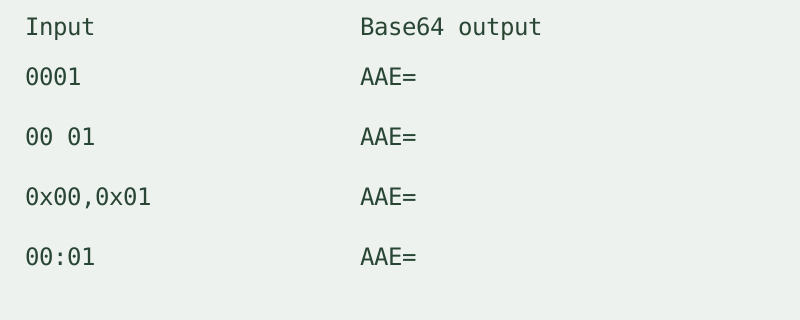
The four spelling variants all parsed to 0001 and produced AAE=. Their measured parsed byte count was two per input. This result follows from the explicit accepted separators and optional prefixes, rather than from deleting every character that is not a hex digit. The leading byte is part of the input; the parser operates on byte pairs.
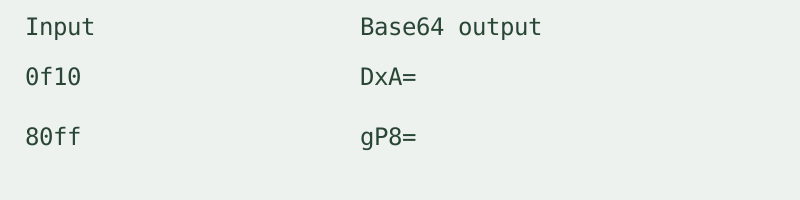
The independent input 0f10 produced DxA=. The input 80ff produced gP8=. Each parsed to two bytes. These rows demonstrate actual binary input, including a high byte value, instead of encoding the visible hex characters as a text sentence. The output cells are measurements from the parser run.
The input abc produced no Base64 result. The recorded reason was an odd hex digit count. The input 00zz01 also produced no result; its recorded reason was invalid hex characters. The tool did not pad a missing nibble, discard the invalid letters or reuse the output from an earlier valid input.
Measured input count: eight. Measured accepted input count: six. Measured rejected input count: two. These counts summarize this controlled set and are not a predicted error rate for other inputs. To repeat the run, leave URL-safe output off, paste each table input, encode it and compare the displayed output or message. Before a malformed input, try a valid row; the result box should then clear on rejection.
The four figures below split this same table into equivalent spellings, distinct bytes, the odd-length input and the invalid-character input. Their values are copied from the recorded table. There is no additional experiment behind the figures.


How to encode
Use this hexadecimal to base64 converter for byte pairs, not a decimal number or prose text. Paste hex, encode and copy the result. Spaces, commas, colons and dashes can separate groups; an optional 0x prefix is accepted at the start of each group. Every group must contain complete byte pairs. Output uses standard Base64 with padding unless the URL-safe option is selected. No account or history is required. Input stays in your browser; available memory limits its size.
Does encoding protect the bytes?
No. Encoding is not encryption or an authenticity check. The result can be decoded by anyone who has it.
Is Base64 to hex the same direction?
No. Use the Base64 to hex converter for an encoded input. This page starts with hexadecimal bytes and produces Base64.
Watch the input comparison
Loading the player connects to YouTube, which may process your IP address and playback information. The converter works without loading it.