SHA256
SHA256 computes SHA-256 only: UTF-8 text in, a hexadecimal or Base64 digest out, entirely in your browser.
Ready. SHA-256 only; input stays in your browser.
Public test vectors, independently computed
We calculated these SHA-256 test messages with Python hashlib and Node crypto independently. Both calculations matched for every row. We also checked the abc, long-message and million-a results against the published expected digests. The table records our computed hex and Base64 outputs; it was generated from the calculations, not copied from another converter.
| Input | UTF-8 bytes | SHA-256 hex | Base64 of digest bytes | Vector check |
|---|---|---|---|---|
| 0 | e3b0c44298fc1c149afbf4c8996fb92427ae41e4649b934ca495991b7852b855 | 47DEQpj8HBSa+/TImW+5JCeuQeRkm5NMpJWZG3hSuFU= | Matched | |
| abc | 3 | ba7816bf8f01cfea414140de5dae2223b00361a396177a9cb410ff61f20015ad | ungWv48Bz+pBQUDeXa4iI7ADYaOWF3qctBD/YfIAFa0= | Matched |
| abcdbcdecdefdefgefghfghighijhijkijkljklmklmnlmnomnopnopq | 56 | 248d6a61d20638b8e5c026930c3e6039a33ce45964ff2167f6ecedd419db06c1 | JI1qYdIGOLjlwCaTDD5gOaM85Flk/yFn9uzt1BnbBsE= | Matched |
| a × 1,000,000 | 1000000 | cdc76e5c9914fb9281a1c7e284d73e67f1809a48a497200e046d39ccc7112cd0 | zcduXJkU+5KBocfihNc+Z/GAmkiklyAOBG05zMcRLNA= | Matched |
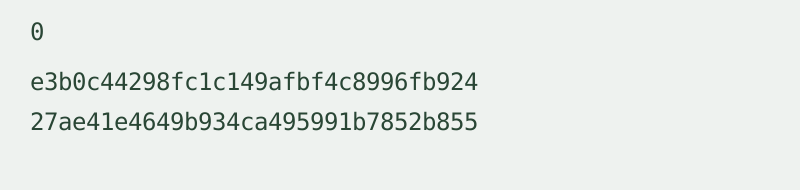
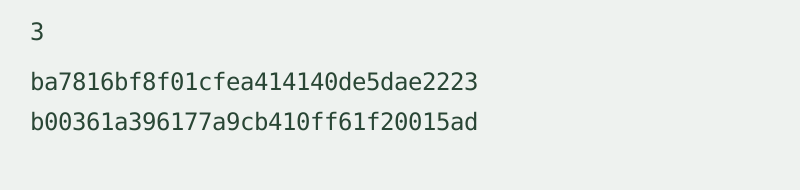
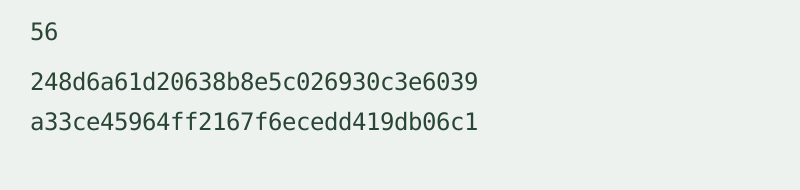
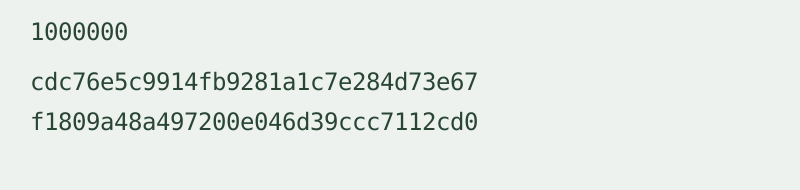
The abc, long-message and million-a vectors and expected digests are documented in RFC 6234, Section 8.5. The empty-string row is independently calculated and cross-checked between the two implementations. Input byte counts were measured after UTF-8 encoding. Base64 values were calculated from the raw digest bytes, not from the visible hex characters. To reproduce the empty and abc rows, use the two sample buttons. For the long-message row, paste the exact input shown in the table. For the final row, supply exactly one million lowercase a characters without a final newline.
Input, output and limits
This sha256 hash generator accepts one text input per run. Text is encoded as UTF-8 exactly as supplied: spaces, line endings, case and combining characters can change the digest. No trimming or normalization is applied. Empty input is valid. There is no file upload or batch mode.
The input limit is 1 MiB of UTF-8 bytes. SHA-256 produces 32 digest bytes, represented as 64 lowercase hex characters or 44 Base64 characters including padding. The limit is checked before hashing. The tool uses the browser’s Web Crypto SHA-256 implementation over HTTPS and does not upload input or save history.
Does this hash generator require an account?
No. It runs without login or registration. One input is processed at a time; there is no daily conversion counter.
Is Base64 output a different algorithm?
No. Both formats represent the same SHA-256 digest bytes. Base64 output is not Base64 text encoding of the hex string.
Can I decode a digest back to text?
No. A digest is not an encoded copy of the input. This page provides hashing, not a decoder, encryption tool or password-storage system. A matching digest does not by itself establish who supplied the input.
Why did a copied sentence produce another digest?
Check spaces, line endings and the exact characters. This tool hashes their UTF-8 byte representation without normalization. The public vectors above require the exact input stated.
Related byte representation walkthrough
This existing video demonstrates hexadecimal byte input and Base64 output. It explains representations, not SHA-256 hashing or the test vectors above.
Loading the player connects to YouTube and shares connection information such as your IP address and playback requests.
For legacy MD5 checks with explicit security limitations, use the MD5 text hash generator.