How to Decode a Base64 Gzip Response with Python Requests
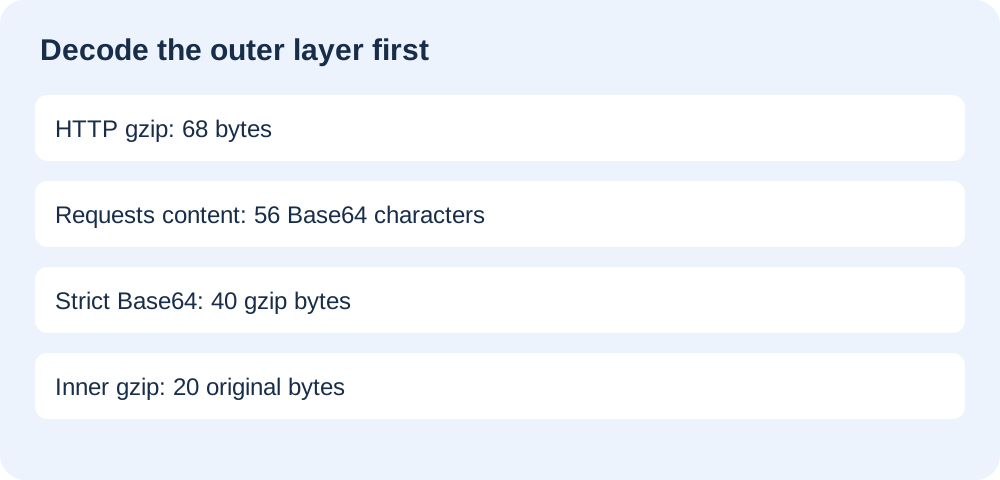
Read response.content, strictly decode its Base64 text, then decompress the recovered gzip bytes. Requests has already removed a valid HTTP gzip layer: our measured response goes from 68 transferred bytes to 56 Base64 characters, then 40 gzip bytes and 20 original bytes.
- Let Requests handle the HTTP
Content-Encodinglayer. - Base64-decode only when the API says its application body is Base64.
- Decompress the inner archive only if the decoded value is a gzip file.
- A false gzip response header fails before normal Base64 processing.
Which gzip layer are you decoding?
HTTP content coding and a compressed file inside Base64 are separate layers. A plain-text response can contain the Base64 representation of a gzip archive; the server can then gzip that text for transport. Reading an already decoded response and manually decompressing its HTTP layer again is the wrong order.
For an ordinary standalone Base64 gzip value, see the gzip decoding experiment. This page isolates the surrounding HTTP response and the point at which automatic decoding happens. It does not repeat the multiple-member archive test.
Four responses from one controlled server
We generated the synthetic message BASE64-HTTP-CONTROL followed by one LF byte on 2026-10-23. Its 20 bytes became a 40-byte gzip archive with a fixed timestamp. Standard padded Base64 produced 56 ASCII characters. Compressing those characters again produced the 68-byte outer body. The script records Python 3.12.14 and Requests 2.34.2; these are measured fixture sizes, not general compression ratios.
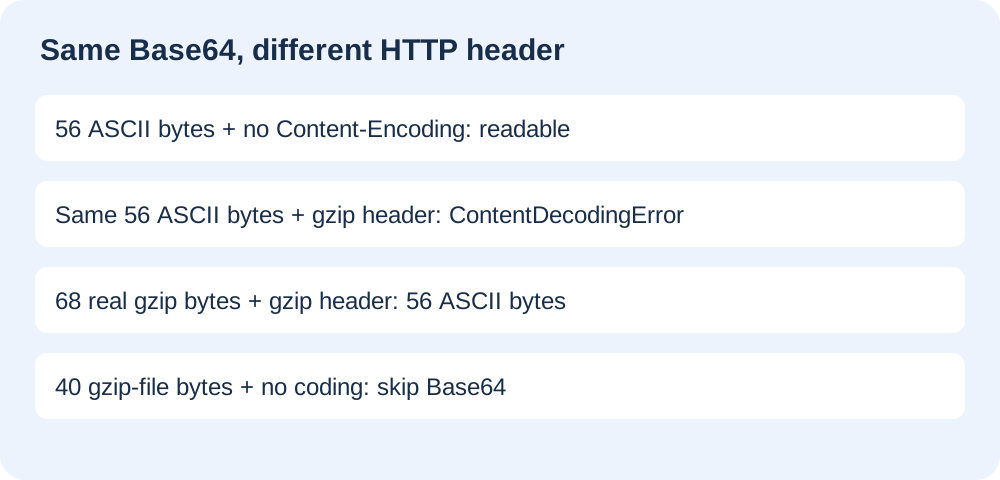
Our server exposes four local paths and never contacts an outside API. The /base64 path sends the 56 ASCII bytes without a content-coding header. The /http-gzip-base64 path sends the 68-byte outer gzip with Content-Encoding: gzip. Both normal client reads return exactly the same 56 bytes, confirmed by identical SHA-256 digests in the raw output.
| Path | HTTP body bytes | Content-Encoding | Requests content | Next operation |
|---|---|---|---|---|
| /base64 | 56 | absent | 56 bytes | Base64, then gzip |
| /http-gzip-base64 | 68 | gzip | 56 bytes | Base64, then inner gzip |
| /false-gzip-header | 56 | gzip | ContentDecodingError | Correct server coding |
| /gzip-file | 40 | absent | 40 bytes | gzip without Base64 |
The negative header control reuses the exact 56-byte Base64 string from the successful plain response, but labels it gzip without compressing it. Normal Requests reading raises ContentDecodingError with an incorrect-header-check message. A separate raw read still recovers those same 56 bytes, and our explicit Base64-then-gzip test recovers the original message. The contrast locates this particular failure in the declared HTTP coding, rather than in padding or the inner archive.
We also sent the original 40-byte archive as application/gzip without content coding. The normal client read retained all 40 archive bytes. Passing those bytes through strict Base64 failed with Only base64 data is allowed; direct gzip decompression instead recovered the same 20-byte message. This fourth control prevents the instruction to Base64-decode every response from accidentally passing as a universal recipe.
Use the application body, not a second HTTP decompression
import base64, gzip, requests

with requests.get(url, timeout=10) as response:
    response.raise_for_status()
    archive = base64.b64decode(response.content, validate=True)
    payload = gzip.decompress(archive)
This short recipe assumes that the API promises a Base64-encoded gzip archive as its entire application body. If the API returns JSON, extract the documented field first. If it returns a binary gzip file, omit Base64 decoding. Never decide which operation to run merely because the URL ends in a particular extension.
On our correctly nested path, trying to gunzip response.content first raised BadGzipFile: Not a gzipped file (b'H4'). The initial H4 belongs to the ASCII representation, not the gzip signature. Conversely, strict Base64 decoding of the 68 raw outer bytes failed. The working chain removed the outer coding once, decoded the remaining Base64 once, and decompressed the inner archive once; the final digest matched our original payload.
Reproduce and inspect the files
Install requests==2.34.2 in a disposable Python environment, save the reproduction script, and run python reproduce.py. It writes the fixtures and JSON next to itself, starts a server only on the loopback interface with an automatically assigned port, runs fresh requests for raw and normal reads, then closes the server. The assertions must remain enabled.
Our recorded arithmetic is 40 archive bytes split into thirteen complete three-byte groups and one remaining byte: standard padded Base64 therefore occupies fourteen groups of four, or 56 characters. The recovered 20-byte payload has SHA-256 95a38c2fa56f0dd4e28bcd0b3748ec980989bf14f62840edae4d22019b29af56. Every successful final recovery in our four-path run matches that digest; the failed branches record their exception instead of inventing a recovered length.
Watch the measured response-layer experiment
Limits and source behavior
Requests documents access to the undecoded response stream, while Python documents strict Base64 validation. Automatic decompression and Base64 decoding are established library behavior. Our contribution is the supplied nested and falsely labelled response controls with their recorded intermediate bytes and failure stages.
This example buffers tiny trusted fixtures. It is not a production downloader, decompression-bomb defense, HTTP framing test, or recommendation to ignore incorrect server headers. Enforce compressed and expanded size limits for untrusted input, handle HTTP failures separately, and repair the server or agreed API contract when coding is wrong. Recompression can produce different gzip bytes across runtimes; compare the stated runtime and recovered payload, not a presumed universal archive length.
Does a valid Base64 string prove the HTTP response is correctly labelled?
No. Base64 validity describes the text supplied to the decoder. It does not validate an HTTP coding header or prove the recovered file is a gzip archive. Identify the failing layer before adding padding, changing text encodings, or decompressing again.