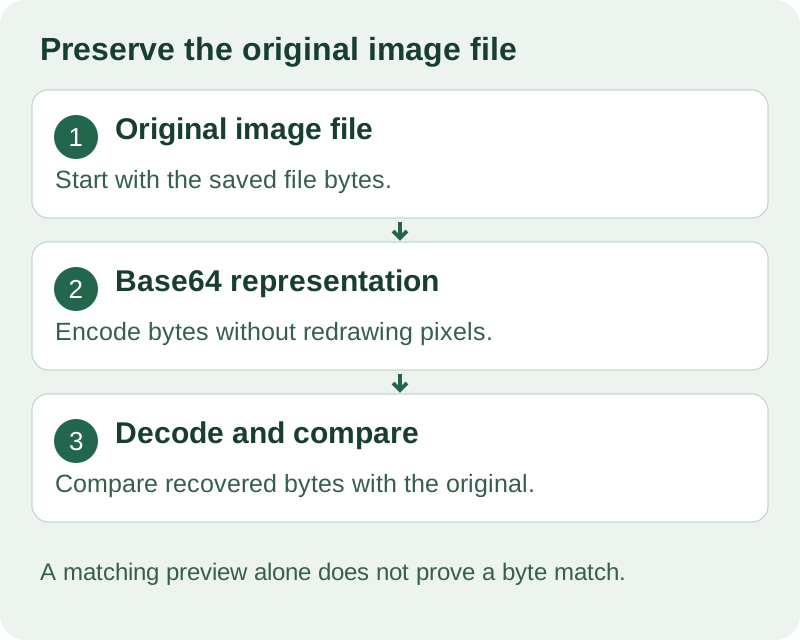
To turn an image into Base64 for a web page, read the image file as a data URL and use the result as the image element’s src. If you already have the file, you do not need to draw it onto a canvas first.
<input id="imageInput" type="file" accept="image/*">
<textarea id="output" readonly></textarea>
<img id="preview" alt="Selected image preview">

<script>
document.getElementById("imageInput").addEventListener("change", (event) => {
  const file = event.target.files[0];
  if (!file) return;

  const reader = new FileReader();
  reader.onload = () => {
    document.getElementById("output").value = reader.result;
    document.getElementById("preview").src = reader.result;
  };
  reader.readAsDataURL(file);
});
</script>
The output is the value to paste into an image element’s src. Converting a remote image URL needs a different check: being able to display an image does not necessarily mean a script can read and export it.
Check the file limit before choosing a converter
The reviewed pages stated these file-size limits:
| Site | File limit | Page wording |
|---|---|---|
| base64-image.de | 1MB | “Up to 20 files · 1 MB each” |
| Base64.Guru | 50MB | “Please note that the image to Base64 encoder accepts any images types with a size of up to 50 MB.” |
| CodeBeautify | 4MB | “Max. 4 MB Limit” |
| Jam | 4MB | “Max size 4MB” |
| elmah.io | 1MB | “Allowed image size: 1 MB” |
| OpenReplay | Not stated | — |
| base64encode.org | 100MB | “The maximum file size is 100MB.” |
| Stack Overflow | Not stated | — |
| Base64.sh | Not verified | “Sorry, you have been blocked” |
| Jared Winick | Not stated | — |
| ScreenSnap Pro | Not stated | — |
The limits in the table describe individual files; embedding several results adds their encoded sizes together. Base64 turns each group of three input bytes into four ASCII characters. With standard padding, a file containing n bytes produces L = 4 × ceil(n / 3) characters. Each character occupies one byte in UTF-8. The pages do not define whether MB means decimal or binary units, so the calculations here explicitly use 1 MB = 1,000,000 bytes; they do not establish the services’ exact byte ceilings. For the stated limits, the calculations are: 1 MB → 4 × ceil(1,000,000 / 3) = 1,333,336 bytes = 1.333336 MB; 4 MB → 4 × ceil(4,000,000 / 3) = 5,333,336 bytes = 5.333336 MB; 50 MB → 4 × ceil(50,000,000 / 3) = 66,666,668 bytes = 66.666668 MB; 100 MB → 4 × ceil(100,000,000 / 3) = 133,333,336 bytes = 133.333336 MB. For the stated allowance of 20 files at 1 MB each, assume each file contains exactly 1,000,000 bytes and is encoded without compression or resizing. Encoding the files separately gives 20 × 1,333,336 = 26,666,720 bytes = 26.666720 MB of Base64 text. This excludes data URL prefixes, HTML or CSS wrappers, and line breaks. Pasting all those strings into one page adds that text to the document before HTTP compression; it does not establish transferred bytes or loading time.
These are published limits, not upload-test results. They do not establish whether an image will be recompressed or whether its metadata will survive.
A larger allowance answers a size question. It does not answer a preservation question.
Why a visible image can fail during export
A reported canvas-export failure produced this message:
Tainted canvases may not be exported
In a separate Vue-and-Express setup, images served through different ports could be displayed, but exporting the remote image through canvas failed. Adding crossOrigin = "anonymous" alone did not solve that setup because the image response did not grant the required cross-origin access.
The working alternative used a configured proxy to retrieve the image as a Blob, then passed that Blob to FileReader.readAsDataURL(). That was a development-proxy solution; the production route still needed corresponding server-side configuration.
Changing the encoding function was not enough. The failed step was access to the remote image data.
Canvas output is not the original file in another wrapper
Previously reported cases show that drawing an image onto canvas and exporting it can produce re-encoded bytes and lose metadata. Those are reported findings, not measurements performed for this article.
This distinction matters when selecting a conversion route. Reading the file and exporting a rendered canvas are different operations, even when both return a data URL that displays an image.
If your task is only to obtain an embeddable string, the file-reading example above avoids adding a canvas export to that workflow. If your workflow deliberately uses canvas, do not describe its output as proof that the original file’s bytes and metadata were preserved.
Related experiment: How to Stream Base64 into UTF-8 Text in Python — watch on YouTube.